 Levels
Volume mixer for Mac
Windows has a Volume Mixer with one slider per app. macOS does not: every built-in sound control on a Mac sets one volume for the whole output device. This page covers what those controls can do, where they stop, and how to get a mixer with a slider per app.
The sound controls macOS has
| Control Center | Control Center > Sound has one volume slider and the list of output devices. System Settings > Control Center > Sound > Always Show in Menu Bar puts the same control in the menu bar. |
| System Settings > Sound | Output volume and balance for the selected device, the output and input device lists, and a separate Alert volume for system alert sounds. |
| Volume keys | The output volume in 16 steps. Option-Shift with a volume key moves a quarter step. |
| Audio MIDI Setup | In Applications > Utilities. Format, sample rate and per-channel levels of each audio device. It works on devices, not on apps. |
| Notifications | System Settings > Notifications > an app > Play sound for notifications turns one app's notification sounds on or off. |
All of these act on the whole Mac or on a device. None of them makes one app quieter than another. Apple has not added a per-app mixer up to macOS 26. The workaround without another app is each app's own volume slider, where it has one, and tab mute in browsers. See how to change volume per app on Mac for the app-by-app list.
A mixer in the menu bar with Levels
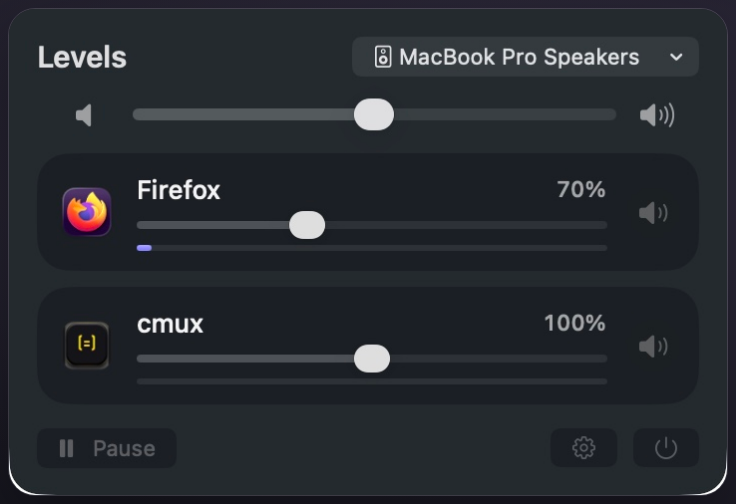
Levels is a menu bar app for macOS 26 that works like a mixer: one window with the output device and system volume at the top, and below them a row for every app that is playing sound.
- Download Levels from levels.tundra.industries, drag it to Applications and open it. Its icon appears in the menu bar.
- Click the icon. The window shows the current output device, which you can switch from the menu, and the system volume slider.
- Play sound in any app. It gets a row within a second, with its own slider, a level meter and a mute button.
- Drag a row's slider. Left is silent, the middle is 100% (the app's normal level), the right end is 200%.
- The first time a slider moves, macOS asks for System Audio Recording permission. Allow it; Levels needs the app's sound to change its level.
What the window looks like
What it does as a mixer
- One slider per app, from silent to 200%, with a snap at 100%. Above 100% a limiter keeps boosted sound from clipping.
- Mute per app: the speaker button on the row silences that app and keeps its slider position.
- Remembered volumes: a level you set is applied again the next time the app plays. Settings > Remembered Volumes lists them, with Forget and Forget All.
- Calls: when a call app turns on the microphone, other apps go down to a level you choose (40% to start) and come back when the call ends. Call apps themselves are left alone so their echo cancellation keeps working.
- Pause returns every app to its normal volume and keeps your settings.
- Apps at 100% are not processed. Quit Levels and every app plays at its normal volume.
Where it differs from the Windows mixer
- Browsers get one row for all their tabs. Levels sets the volume of the whole browser, not of one tab; browsers can mute single tabs themselves.
- System alert sounds have no row. Their level is the Alert volume in System Settings > Sound.
- Levels changes what apps play. It does not change microphones.
- macOS shows a purple indicator in the menu bar while Levels adjusts apps, because it receives their sound to play it again at your level. The sound stays in memory and is never saved or sent anywhere.
Download Levels
Levels needs macOS 26 or later. It works fully for 7 days from the first launch, with no plan and no card. After that: Year $4.99 a year, or Own it $12.99 once. One license key works on up to 3 Macs. Sold through Stripe; refunds within 14 days.
Download for MacBuy YearBuy Own it
Questions
Does macOS have a built-in volume mixer?
No. macOS has one output volume per device and a separate alert volume. Per-app levels need each app's own slider or a mixer app such as Levels.
Does Levels install an audio driver?
No. It uses Core Audio process taps, a public macOS API, and needs no driver, kernel extension or virtual output device.
Which macOS version does Levels need?
macOS 26 or later.
What does Levels cost?
It is free for 7 days from the first launch, then Year $4.99 a year or Own it $12.99 once. It is sold on levels.tundra.industries, not on the App Store.
Last checked: October 2026 on macOS 26.