 Levels
How to find which app is playing sound on Mac
A chime, a voice or music from a background tab, and no window in sight that is making it. macOS has no single list of apps that are playing sound, but several places together usually find it. Work through them from the quickest.
Checks in macOS
- Open Control Center and look at Now Playing. Media apps and browser videos that report what they play show their name and a pause button there. Apps that do not report it, such as many games and call apps, are missing.
- Look at the browser tabs. Safari, Chrome and Firefox show a speaker icon on a tab that is playing sound. Click the icon to mute that tab.
- For short alert sounds, check notifications. Open Notification Center to see which app posted something just now, then turn off its sound in System Settings > Notifications > that app > Play sound for notifications.
- Check login items and background apps in System Settings > General > Login Items & Extensions. An app you forgot about may be starting with the Mac.
- In Terminal, run
pmset -g assertionswhile the sound plays. Playing audio keeps the Mac awake, and on many Macs the lines from coreaudiod name the process ID the audio was created for. Look that ID up in Activity Monitor (View > Columns > PID).
What does not tell you
- Activity Monitor has no sound column. A busy app is not necessarily the one making sound.
- The orange dot in the menu bar means an app is using the microphone, not playing sound. Control Center names that app, which helps when a call app is the source.
- The volume keys and Control Center change every app at once and do not say which app is loud.
A live list of apps playing sound with Levels
Levels is a menu bar app for macOS 26. Its window has a row for every app that is playing sound right now or played in the last 30 seconds. A row appears within a second of the app starting to play, so the source of a sound shows up while you listen.
- Open Levels from its icon in the menu bar while the sound is playing.
- Read the rows. Each one names the app, with its icon. Helper processes are counted under their app: all tabs of a browser share one row, and a game gets a row of its own.
- Click the speaker button on the row to mute that app, or drag its slider down. The app keeps running; only its sound changes.
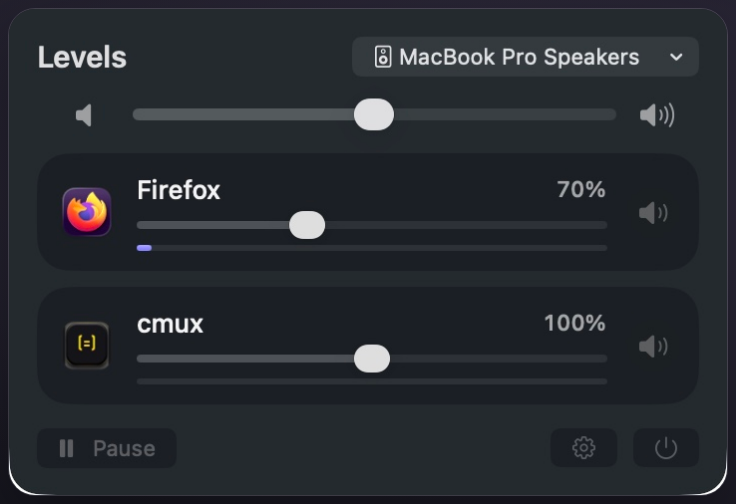
System alert sounds are not listed; their level is the Alert volume in System Settings > Sound. The level meter on a row moves only for apps you have adjusted, because Levels does not touch an app left at 100%.
Download Levels
Levels needs macOS 26 or later. It works fully for 7 days from the first launch, with no plan and no card. After that: Year $4.99 a year, or Own it $12.99 once. One license key works on up to 3 Macs. Sold through Stripe; refunds within 14 days.
Download for MacBuy YearBuy Own it
Questions
Why do I hear sound but no app shows in Now Playing?
Now Playing only shows apps that report what they play. Games, call apps, alert sounds and many utilities do not.
Can a website keep playing sound after I close the tab?
Not after the tab is closed. Check other windows and tabs of every browser, including private windows, and look for the speaker icon on each tab.
Does Levels record the sound it lists?
No. Levels lists apps from the system's process information. It only receives an app's sound after you move that app's slider, and then keeps it in memory to play it at your level. Nothing is saved or sent.
Is Levels free?
It is free for 7 days from the first launch, then Year $4.99 a year or Own it $12.99 once. Without a plan it still lists every app that plays sound, but changes nothing.
Last checked: October 2026 on macOS 26.